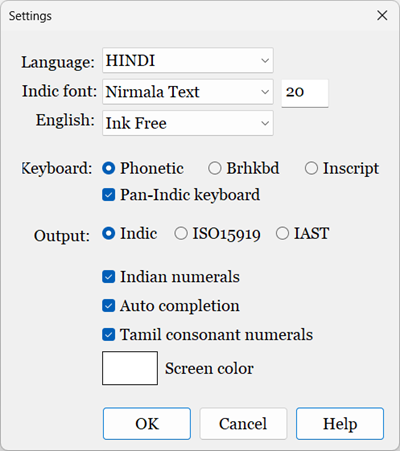
Settings dialog box can be accessed by selecting Settings | Settings... menu command.
Language: Select language
Font: Select font for selected language
Keyboard: Select keyboard used for Indian languages. [Phonetic, Brhkbd, Inscript]
Output: Select output type. [Indic, ISO15919, IAST]
| Dev short e/o support: | Applies to Sanskrit, Hindi, and Marathi languages only |
| checked | e, o used for ऎ, ऒ, and E, O used for ए, ओ |
| unchecked | e, E used for ए and o, O used for ओ |
| Tamil n/nx rules: | Applies to Tamil language only |
| checked | n used for ந and ன |
| unchecked | n used for ந and nx used for ன |
Tamil consonant numerals: Subscript numerals (ex: க₂, க₃, க₄) are used for க, ச, ஜ, ட, த, ப consonants
Indian numerals: Use Indian numerals instead of English numerals
Auto completion: Enable/Disable auto completion. Read auto completion topic
Screen color: Select screen color